

Uncategorized
Rabby install and the security trade-offs every DeFi power user should test
Common misconception first: installing a “secure” wallet extension is the end of your security work. Many users assume downloading a reputable extension ends the chain of responsibility. It does not. For DeFi power users, the device, the extension, the way you interact with dApps, and operational habits all shape your exposure. This article dissects the mechanisms Rabby provides, compares it to typical alternatives, and gives practical heuristics for deciding whether Rabby’s combination of transaction simulation, pre-sign risk scanning, and multi-chain convenience fits your threat model.
If you are in the US and you manage meaningful on-chain capital or run institutional workflows, this is an operational checklist as much as a product review. I’ll explain how Rabby works under the hood in plain terms, where it materially reduces risk, where it doesn’t, and how to configure it (including install options) so its security features meaningfully lower exposure rather than simply creating a false sense of safety.
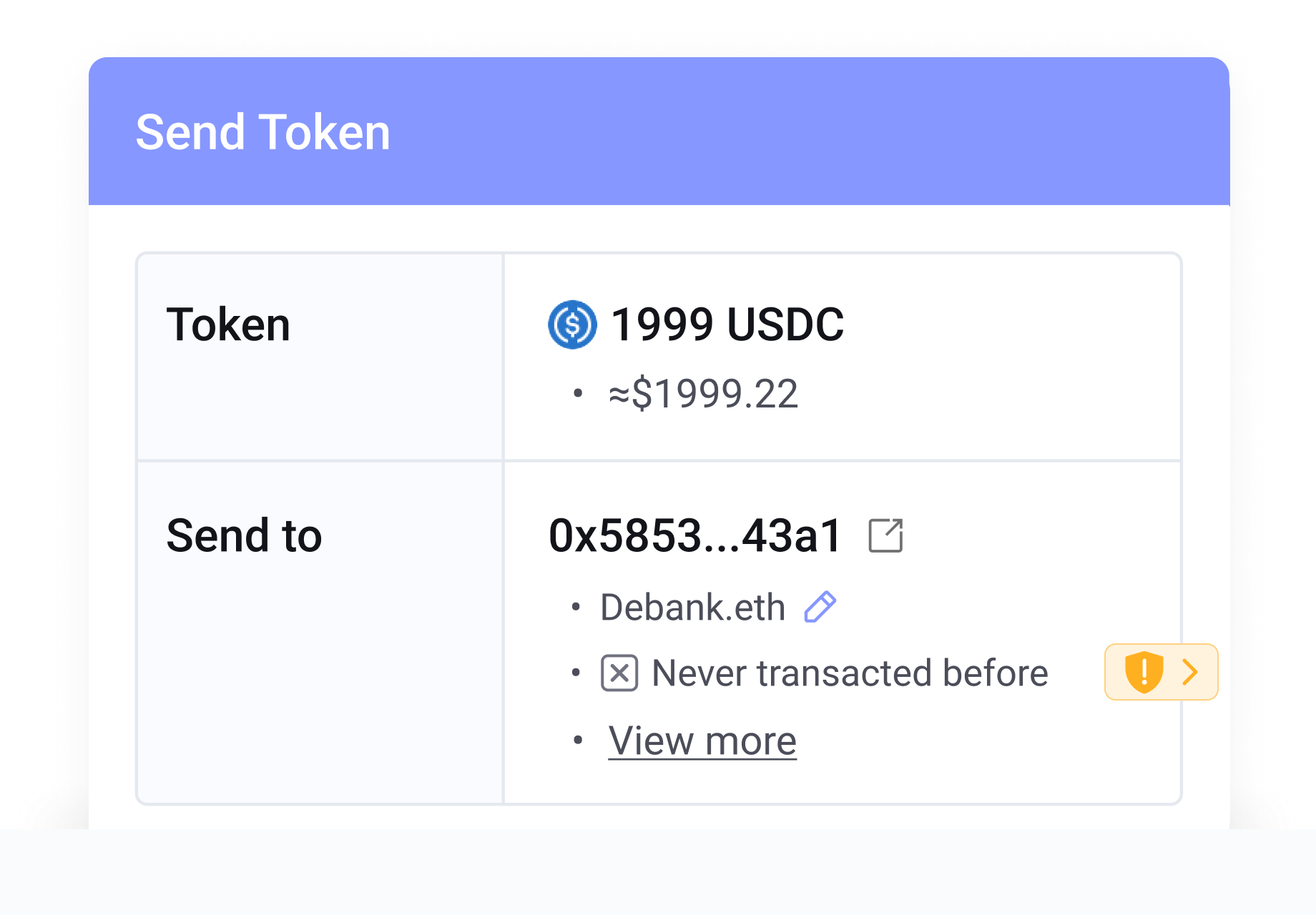
How Rabby’s core protections work — mechanism, not marketing
Rabby is a non-custodial, multi-chain wallet developed by DeBank and available as a Chromium-based browser extension, mobile app (iOS/Android), and desktop client (Windows/macOS). Two of its features matter most mechanistically: transaction simulation and pre-transaction risk scanning.
Transaction simulation performs a dry-run of what a transaction will do to your token balances and gas. Mechanism: before your private key is used to sign, the wallet submits the transaction call(s) to a node or local engine to estimate state changes. That output is parsed into precise delta values—how many tokens will leave your account, what fees will be charged, and which contract functions will be invoked. That explicit numeric preview is the single most effective countermeasure to blind signing, because it gives you a concrete, verifiable result to compare against the dApp’s UI.
Pre-transaction risk scanning layers on top of simulation. Rabby checks transactions against a security engine that flags known compromised contracts, suspicious approval requests, and even recipient addresses that don’t resolve to sensible contracts or users. This is not magic: it depends on curated threat intelligence feeds, heuristics (e.g., high-value approval amounts, newly created contracts), and past incident databases. That leads to materially useful alerts, but also to false positives and blind spots: novel exploit vectors and zero-day contract bugs won’t be in the database yet.
Install paths and practical configuration — picking the right surface
Rabby is distributed as a browser extension for Chrome, Brave, and Edge, but you can also use its desktop client or mobile app. Which install path matters for risk:
– Browser extension: most convenient for heavy dApp usage, but it raises classic extension risks — malicious extensions, compromised browser profiles, or supply‑chain attacks on the extension store. Use a dedicated browser profile with a minimal set of extensions, enable browser-level protections, and prefer manual verification of the extension checksum or the official site when possible.
– Desktop client: reduces browser‑based attack surface (no malicious extension interfering with DOM), but increases reliance on OS-level security. On Windows or macOS, enforce disk encryption, keep the OS updated, and run the client from verified sources.
– Mobile app: good for on-the-go interactions and hardware wallet pairing via Bluetooth, but mobile OS permission models and app store risks apply. Use official stores and verify developer identity where feasible.
When installing, consider hardware wallet integration: Rabby supports Ledger, Trezor, Keystone, CoolWallet, GridPlus, and BitBox02. Pairing the extension to a hardware key materially moves the private key out of the host machine — a simple yet high-impact defense against many remote compromise scenarios. For any substantial balance, prefer a hardware-backed setup with the extension as the UX layer rather than the custodian of your seed.
Side-by-side trade-offs: Rabby versus common alternatives
Power users will ask how Rabby compares to MetaMask, Trust Wallet, or Coinbase Wallet. Below is a compact mechanistic comparison framed as trade-offs rather than marketing claims.
– Transaction awareness: Rabby’s simulation and explicit balance deltas give it an edge over MetaMask’s default UX where blind signing remains common. That reduces accidental approvals and phishing swaps in practice. The trade-off is complexity: Rabby surfaces more data, which requires disciplined interpretation; novices can be confused by raw gas and delta figures.
– Automatic network switching: Rabby auto-switches to the chain a dApp requires. This smooths UX across dozens of EVM chains, but it increases the importance of verifying network identity (chain ID, RPC endpoint) because automatic switching can make it easier to be redirected to malicious testnets or RPC endpoints. Always confirm the network in the transaction simulation output.
– Approval revocation: Rabby’s built-in revocation tool reduces long-lived approval risk by making it easier to find and cancel token allowances. Compared to wallets lacking this feature, it closes a common attack path. The boundary condition: revocation is preventative only — if a contract is already malicious and has been executed, revocation is too late.
– Institutional features: Rabby integrates with multi-sig and custody solutions (Gnosis Safe, Fireblocks, Amber), making it a practical choice for teams. Compared to single-key mobile wallets, this is a strong advantage for operational security; the trade-off is added latency and coordination overhead in signing flows.
Where Rabby reduces risk and where it doesn’t
Short summary: Rabby reduces the risk of blind signing, token approval abuse, and many common UX-driven mistakes. It increases defense-in-depth if used with hardware keys and multi-sig. But it is not a panacea.
Things Rabby helps with reliably:
– Detecting and explaining token outflows before signing via simulation.
– Flagging known malicious contracts and suspicious approvals via the security engine.
– Allowing fast revocation of approvals to limit future exposure.
– Enabling hardware wallets and multi-sig for higher-attestation workflows.
Gaps and limitations to keep in mind:
– Zero-day smart contract vulnerabilities or novel exploit logic will not be flagged until threat intel catches up.
– Rabby does not provide a fiat on-ramp or native staking features; you’ll still need other services for those flows.
– Supply-chain risk during extension install and the security of the host environment remain critical; an extension that is user-facing cannot protect a compromised OS or browser profile.
– Simulation is as accurate as the RPC node and state used; if you are using a malicious or stale RPC provider, the simulated outcome could be wrong. Prefer reputable RPCs and verify critical transactions on-chain where possible.
Practical heuristics — a decision-useful checklist
Here are reproducible rules you can apply when installing and operating Rabby as a DeFi power user:
1. Use hardware wallets for any funds you cannot afford to lose; treat Rabby as the UX and storage gate for signing rather than the custodian. 2. Keep a dedicated browser profile for Web3, with only Rabby (and essential extensions) enabled — minimize cross-extension attack surface. 3. Always read the simulation delta: does the token outflow match the dApp’s intent? If not, reject and inspect. 4. For large approvals, opt for limited allowances rather than infinite approvals and use Rabby’s revocation tool routinely. 5. When a dApp triggers an automatic network switch, compare chain ID and RPC endpoint in the transaction preview before consenting. 6. Integrate multi-sig or institutional custody for team-managed treasuries to split trust and add operational checks.
Install walkthrough (brief) and where to get the extension
Install choices: browser extension for daily trading, desktop client for a cleaner host environment, or mobile app for travel. For reliability and to avoid impostor copies, install from official sources. For a concise introduction and official install links, see this page on the rabby wallet maintained for users.
After installation, immediately: create or import your wallet, enable hardware wallet pairing if you have a cold key, and enable any built-in privacy or security toggles. Seed phrases should be written offline and stored in a physically secure location; do not store seeds or private keys in password managers without hardware-backed encryption specifically designed for secret storage.
What to watch next — conditional scenarios and signals
Watch these signals to reassess whether Rabby remains the right tool for your stack:
– New classes of exploits that bypass simulation (e.g., re-entrancy patterns that manifest only post-execution) would weaken the simulation safety margin. If the community documents such cases, treat simulation as a helpful but insufficient guard.
– Improvements in RPC-level attestation (signed state proofs from nodes) would strengthen simulation accuracy; if Rabby integrates verifiable RPCs, that materially raises confidence in dry-run outputs. Conversely, incidents of extension store tampering should immediately trigger re-evaluation of extension trust chains.
– Broader institutional adoption (more custody integrations) would solidify Rabby’s product-market fit for teams. Track integration announcements and independent audits as signals for operational maturity.
FAQ
Is Rabby safer than MetaMask?
Depend on the definition of “safer.” Mechanistically, Rabby’s transaction simulation and pre-sign risk scanning reduce the incidence of blind signing and unobserved approvals, which are common vectors for user loss. But both wallets inherit host-level and supply-chain risks. For large amounts, safety still requires hardware wallets and good operational hygiene; Rabby reduces certain user‑interface risks rather than replacing hardware-backed protection.
Can Rabby prevent zero-day smart contract exploits?
No. Rabby can flag known malicious contracts and suspicious patterns, and it simulates visible state changes before signing. However, novel exploit logic or subtle contract bugs that only reveal themselves at execution time may not be detectable. Treat simulation as a strong preventative control for UX-driven errors, not as a formal verification of contract safety.
Should I install the browser extension or desktop client?
Choose based on your threat model. Browser extensions are convenient for active trading and many dApps; desktop clients reduce browser-related attack surface. If you use both, segregate high-value wallets to hardware-backed desktop profiles and keep smaller operational balances in the browser profile.
How does Rabby handle multiple chains and gas?
Rabby supports over 90 EVM-compatible chains and can auto-switch networks when a dApp requires it. It also provides a cross-chain gas top-up feature to send gas tokens to a chain where you lack funds. These conveniences reduce friction but increase the need to check network and fee details in the transaction preview to avoid mistakes or RPC-level manipulation.
Final practical takeaway: Rabby shifts security from opaque to inspectable by making post-intent state changes explicit before signing. That is a genuine advance for DeFi operational practice, but its value depends on the user reading and acting on those signals and combining the wallet with good host security and hardware keys. In other words: install it, use the simulation, but don’t outsource vigilance to the extension.


